ArgoCD 2. ArgoCD Slack Notification
Argocd Slack Notification 구성 과정을 설명합니다.
0. 들어가기 전에
ArgoCD 구성 이후 Sync 동작이 완료되거나 문제가 있을 경우 Slack으로 notification을 전달하고 싶었습니다. 하지만 공식 가이드 대로 진행하니 잘 동작하지 않았습니다. 꽤 불필요한 시간을 소비했고, 다시 정리하면서 문제를 해결하고 과정을 기록하고자 합니다.
또한 ArgoCD 공식 notifiaction 이외에도 ArgoCD 가 제안하는 다른 방식으로도 notification을 구성할 수 있습니다.
가장 star 수가 많은 kubewatch로 K8S deploy 상태를 확인하여 slack webhook으로 전달하는 것은 어렵지 않게 성공할 수 있었으나, argo sync의 성공 여부를 판단하여 notification을 주고 싶었기 때문에 ArgoCD 공식 notification을 다시 짚어보기로 결정했습니다.
1. 문제의 발생
공식 가이드 대로 notification을 구성하니 잘 동작하지 않았습니다. 다시 천천히 문서를 살펴보니 helm 설치 관련된 내용이 하단부에 있었습니다. 이 글에 따르면 아래와 같이 helm v3으로 notification을 쉽게 구성할 수 있다고 가이드하고 있지만 결과는 잘 동작하지 않습니다.
helm repo add argo https://argoproj.github.io/argo-helm
helm install argo/argocd-notifications --generate-name \
    --set triggers[0].name=on-sync-succeeded \
    --set triggers[0].enabled=true \
    --set secret.notifiers.slack.enabled=true \
    --set secret.notifiers.slack.token=<my-token>

Error: YAML parse error on argocd-notifications/templates/configmap.yaml: error converting YAML to JSON: yaml: line 15: did not find expected key
https://github.com/argoproj/argo-helm/issues/616 이 글에도 같은 문제가 있는데 글 작성 기준으로 해결되지 않은 상태로 있습니다.
2. 처음부터 짚어보기
2.1 slack 봇 생성
공식 가이드 문서에도 이부분은 잘 나와있지만 지금 글 쓰는 시점에서의 slack api 화면 구성과 약간 다르기 때문에 몇가지 부분만 캡쳐한 내용을 올립니다. 하지만 가이드 문서 내용에 이슈는 없습니다.
https://api.slack.com/apps?new_app=1 화면으로 가서 아래와 같은 과정을 거칩니다.
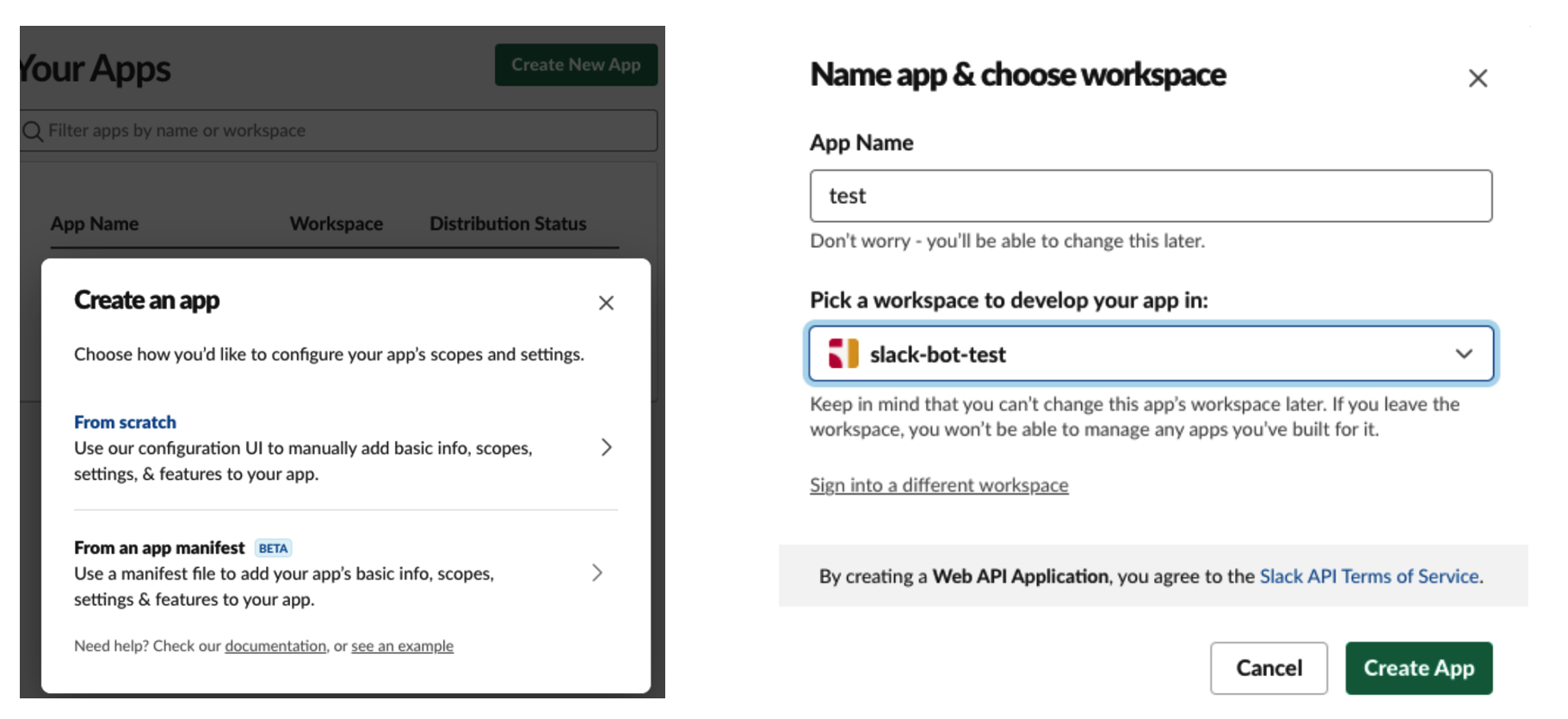
app 생성하는 화면이 변경되었습니다. (21.07.17 기준) 이후에도 변경될 수 있지만 참고로 봐주시기 바랍니다.
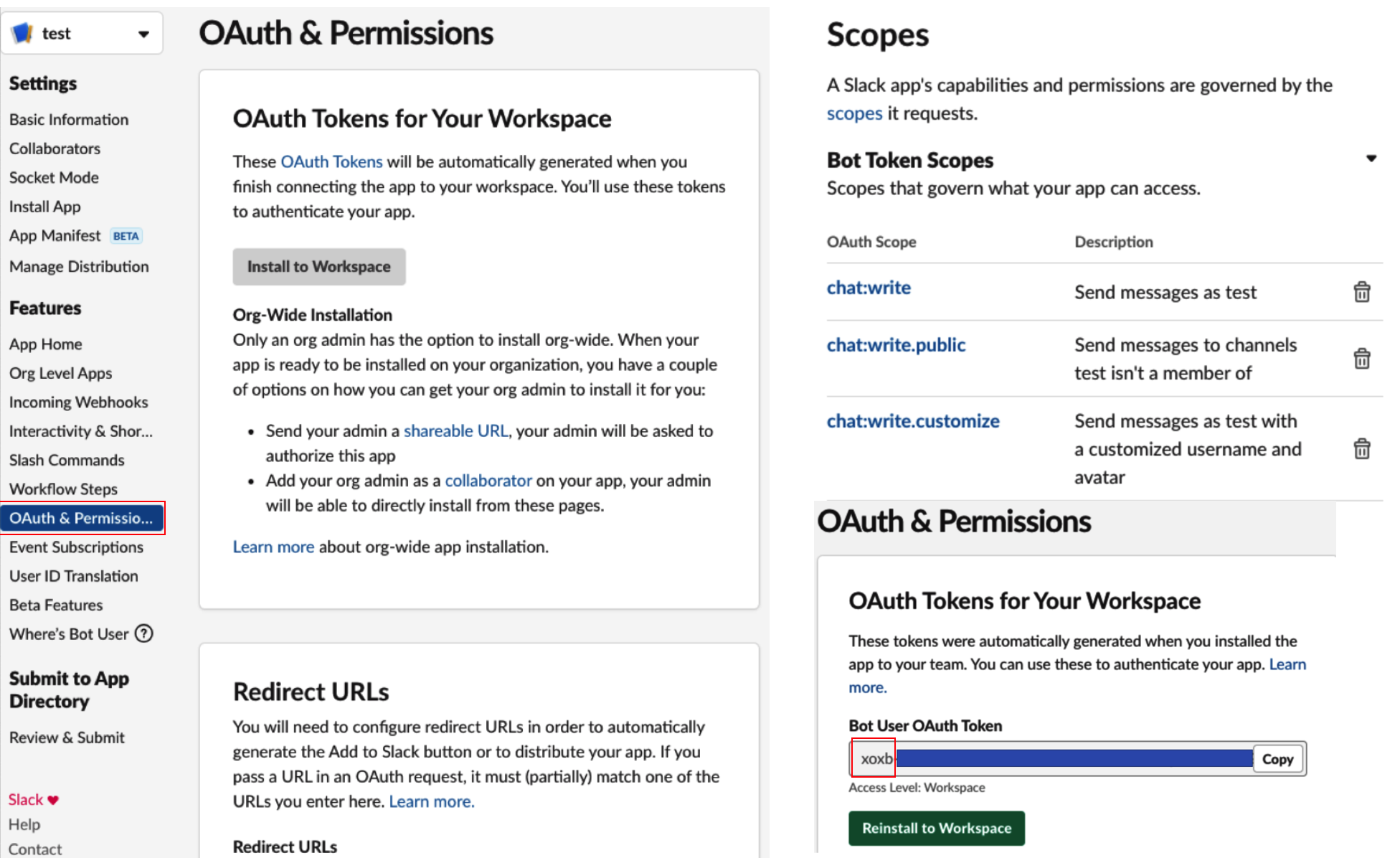
Scopes는 필요하다고 생각되는 권한을 부여했고 OAuth Token 보면 공식 가이드는 xoxp로 시작하는데 xoxb로 생성되고 있으며 Bot Token Scopes로 권한을 주면 됩니다.
이렇게 권한을 부여한 뒤 원하는 workspace 및 channel로 Install 해줍니다.
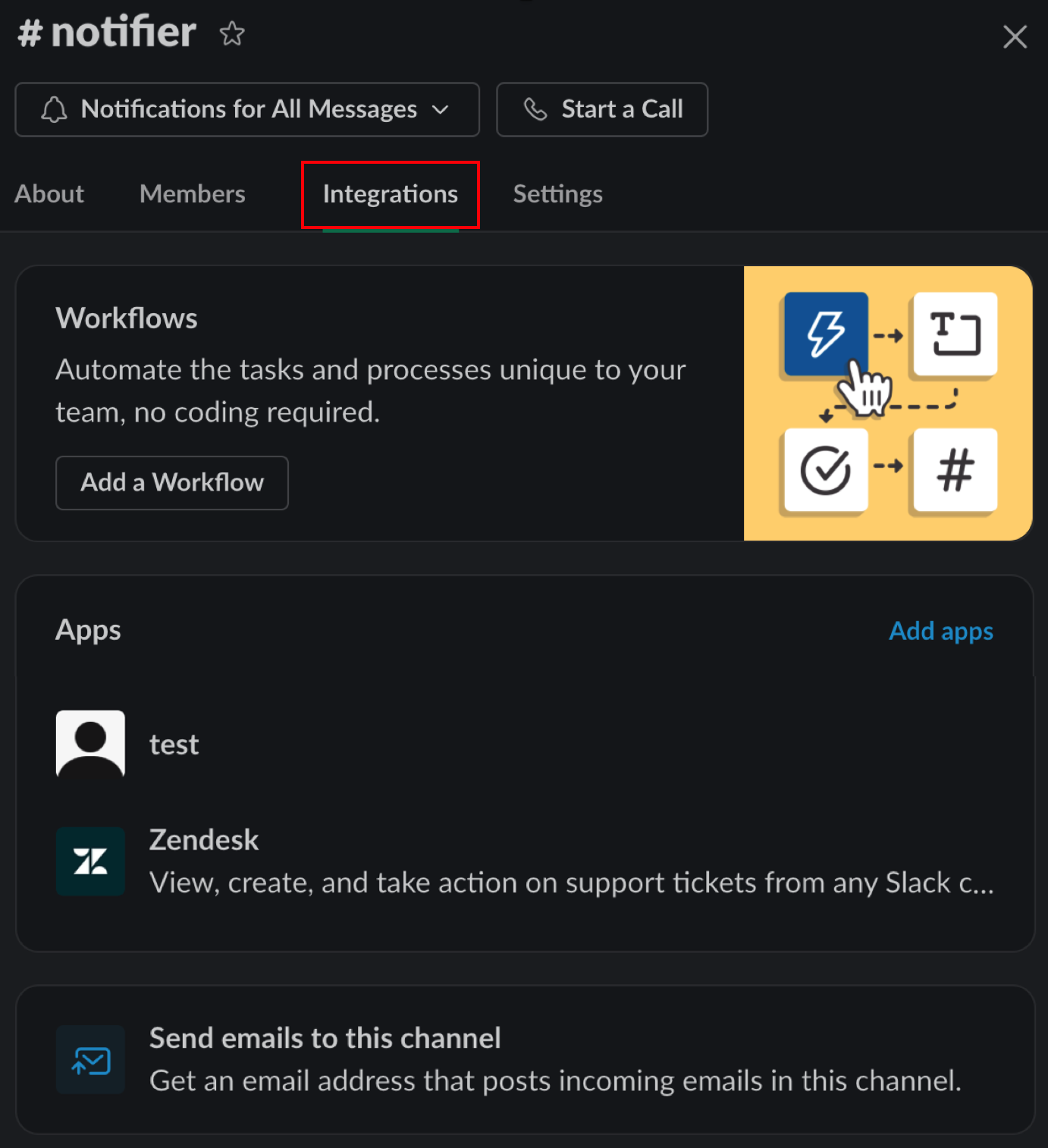
slack 내 Integrations에 해당 앱이 추가되어 있지 않으면 알림이 오지 않습니다.
2.2 Kubernetes에 notifier 및 template 설치하기
공식 가이드 대로도 해보고 여러 글들을 찾아서 다 해봤는데, 정말 많은 시행착오 끝에 아래 내용으로 알람이 오는것을 확인했으며, 설치와 관련된 글은 링크를 확인하시기 바랍니다.
주의할점은 argocd가 설치된 namespace와 똑같은 공간에 notifier와 template 등을 설치하셔야 합니다.
2.2.1 argocd-notifications-secret.yaml (신규 생성)
apiVersion: v1
kind: Secret
metadata:
  name: argocd-notifications-secret
stringData:
  notifiers.yaml: |
    slack:
      token:
slack token은 앞서 발급받은 xoxb로 시작하는 oauth token을 입력합니다. ( 까지 지워야 합니다.)
kubectl apply -f argocd-notifications-secret.yaml -n argocd
2.2.2 notification.yaml
kubectl apply -n argocd -f https://raw.githubusercontent.com/argoproj-labs/argocd-notifications/release-1.0/manifests/install.yaml
공식 가이드에선 위 내용을 바로 apply 하라고 나오는데, 반영 후 아래 내용을 추가해도 좋고 제가 수정 반영해놓은 반영된 전체 yaml 파일을 복사하셔서 apply 해도 됩니다.
apiVersion: v1
kind: ConfigMap
metadata:
  creationTimestamp: null
  name: argocd-notifications-cm
data:
  config.yaml: |
    triggers:
      - name: on-sync-succeeded
        enabled: true
반영된 전체 yaml 파일
apiVersion: v1
kind: ServiceAccount
metadata:
  name: argocd-notifications-controller
---
apiVersion: rbac.authorization.k8s.io/v1
kind: Role
metadata:
  name: argocd-notifications-controller
rules:
- apiGroups:
  - argoproj.io
  resources:
  - applications
  - appprojects
  verbs:
  - get
  - list
  - watch
  - update
  - patch
- apiGroups:
  - ""
  resources:
  - secrets
  - configmaps
  verbs:
  - get
  - list
  - watch
---
apiVersion: rbac.authorization.k8s.io/v1
kind: RoleBinding
metadata:
  name: argocd-notifications-controller
roleRef:
  apiGroup: rbac.authorization.k8s.io
  kind: Role
  name: argocd-notifications-controller
subjects:
- kind: ServiceAccount
  name: argocd-notifications-controller
---
apiVersion: v1
kind: ConfigMap
metadata:
  creationTimestamp: null
  name: argocd-notifications-cm
data:
  config.yaml: |
    triggers:
      - name: on-sync-succeeded
        enabled: true
---
apiVersion: v1
kind: Secret
metadata:
  name: argocd-notifications-secret
type: Opaque
---
apiVersion: v1
kind: Service
metadata:
  labels:
    app.kubernetes.io/name: argocd-notifications-controller-metrics
  name: argocd-notifications-controller-metrics
spec:
  ports:
  - name: metrics
    port: 9001
    protocol: TCP
    targetPort: 9001
  selector:
    app.kubernetes.io/name: argocd-notifications-controller
---
apiVersion: apps/v1
kind: Deployment
metadata:
  name: argocd-notifications-controller
spec:
  selector:
    matchLabels:
      app.kubernetes.io/name: argocd-notifications-controller
  strategy:
    type: Recreate
  template:
    metadata:
      labels:
        app.kubernetes.io/name: argocd-notifications-controller
    spec:
      containers:
      - command:
        - /app/argocd-notifications-backend
        - controller
        image: argoprojlabs/argocd-notifications:v1.0.2
        imagePullPolicy: Always
        name: argocd-notifications-controller
        volumeMounts:
        - mountPath: /app/config/tls
          name: tls-certs
        workingDir: /app
      securityContext:
        runAsNonRoot: true
      serviceAccountName: argocd-notifications-controller
      volumes:
      - configMap:
          name: argocd-tls-certs-cm
        name: tls-certs
kubectl apply -f notification.yaml -n argocd
2.2.3 templates.yaml
공식 가이드에선 위 내용을 바로 apply 하라고 합니다. 위 내용을 내려받으면 특정 조건에서 동작할 메세지 등이 정의된 내용을 확인할 수 있습니다.
kubectl apply -n argocd -f https://raw.githubusercontent.com/argoproj-labs/argocd-notifications/release-1.0/catalog/install.yaml
위 내용을 내려받은 yaml 파일
apiVersion: v1
data:
  template.app-deployed: |
    email:
      subject: New version of an application  is up and running.
    message: |
      :white_check_mark: Application  is now running new version of deployments manifests.
    slack:
      attachments: |
        [{
          "title": "",
          "title_link":"/applications/",
          "color": "#18be52",
          "fields": [
          {
            "title": "Sync Status",
            "value": "",
            "short": true
          },
          {
            "title": "Repository",
            "value": "",
            "short": true
          },
          {
            "title": "Revision",
            "value": "",
            "short": true
          }

          ,
          ,
          {
            "title": "",
            "value": "",
            "short": true
          }

          ]
        }]
  template.app-health-degraded: |
    email:
      subject: Application  has degraded.
    message: |
      :exclamation: Application  has degraded.
      Application details: /applications/.
    slack:
      attachments: |-
        [{
          "title": "",
          "title_link": "/applications/",
          "color": "#f4c030",
          "fields": [
          {
            "title": "Sync Status",
            "value": "",
            "short": true
          },
          {
            "title": "Repository",
            "value": "",
            "short": true
          }

          ,
          ,
          {
            "title": "",
            "value": "",
            "short": true
          }

          ]
        }]
  template.app-sync-failed: |
    email:
      subject: Failed to sync application .
    message: |
      :exclamation:  The sync operation of application  has failed at  with the following error:
      Sync operation details are available at: /applications/?operation=true .
    slack:
      attachments: |-
        [{
          "title": "",
          "title_link":"/applications/",
          "color": "#E96D76",
          "fields": [
          {
            "title": "Sync Status",
            "value": "",
            "short": true
          },
          {
            "title": "Repository",
            "value": "",
            "short": true
          }

          ,
          ,
          {
            "title": "",
            "value": "",
            "short": true
          }

          ]
        }]
  template.app-sync-running: |
    email:
      subject: Start syncing application .
    message: |
      The sync operation of application  has started at .
      Sync operation details are available at: /applications/?operation=true .
    slack:
      attachments: |-
        [{
          "title": "",
          "title_link":"/applications/",
          "color": "#0DADEA",
          "fields": [
          {
            "title": "Sync Status",
            "value": "",
            "short": true
          },
          {
            "title": "Repository",
            "value": "",
            "short": true
          }

          ,
          ,
          {
            "title": "",
            "value": "",
            "short": true
          }

          ]
        }]
  template.app-sync-status-unknown: |
    email:
      subject: Application  sync status is 'Unknown'
    message: |
      :exclamation: Application  sync is 'Unknown'.
      Application details: /applications/.


          *


    slack:
      attachments: |-
        [{
          "title": "",
          "title_link":"/applications/",
          "color": "#E96D76",
          "fields": [
          {
            "title": "Sync Status",
            "value": "",
            "short": true
          },
          {
            "title": "Repository",
            "value": "",
            "short": true
          }

          ,
          ,
          {
            "title": "",
            "value": "",
            "short": true
          }

          ]
        }]
  template.app-sync-succeeded: |
    email:
      subject: Application  has been successfully synced.
    message: |
      :white_check_mark: Application  has been successfully synced at .
      Sync operation details are available at: /applications/?operation=true .
    slack:
      attachments: "[{\n  \"title\": \"\",\n  \"title_link\":\"/applications/\",\n  \"color\": \"#18be52\",\n  \"fields\": [\n  {\n    \"title\": \"Sync Status\",\n    \"value\": \"\",\n    \"short\": true\n  },\n  {\n    \"title\": \"Repository\",\n    \"value\": \"\",\n    \"short\": true\n  }\n  \n  ,\n  ,\n  {\n    \"title\": \"\",\n    \"value\": \"\",\n    \"short\": true\n  }\n  \n  ]\n}]    "
  trigger.on-deployed: |
    - description: Application is synced and healthy. Triggered once per commit.
      oncePer: app.status.sync.revision
      send:
      - app-deployed
      when: app.status.operationState.phase in ['Succeeded'] and app.status.health.status == 'Healthy'
  trigger.on-health-degraded: |
    - description: Application has degraded
      send:
      - app-health-degraded
      when: app.status.health.status == 'Degraded'
  trigger.on-sync-failed: |
    - description: Application syncing has failed
      send:
      - app-sync-failed
      when: app.status.operationState.phase in ['Error', 'Failed']
  trigger.on-sync-running: |
    - description: Application is being synced
      send:
      - app-sync-running
      when: app.status.operationState.phase in ['Running']
  trigger.on-sync-status-unknown: |
    - description: Application status is 'Unknown'
      send:
      - app-sync-status-unknown
      when: app.status.sync.status == 'Unknown'
  trigger.on-sync-succeeded: |
    - description: Application syncing has succeeded
      send:
      - app-sync-succeeded
      when: app.status.operationState.phase in ['Succeeded']
kind: ConfigMap
metadata:
  creationTimestamp: null
  name: argocd-notifications-cm
kubectl apply -f templates.yaml -n argocd
2.3 트리거 등록
트리거들은 아래와 같은 종류들이 있고, 두가지 방법으로 등록 할 수 있습니다.
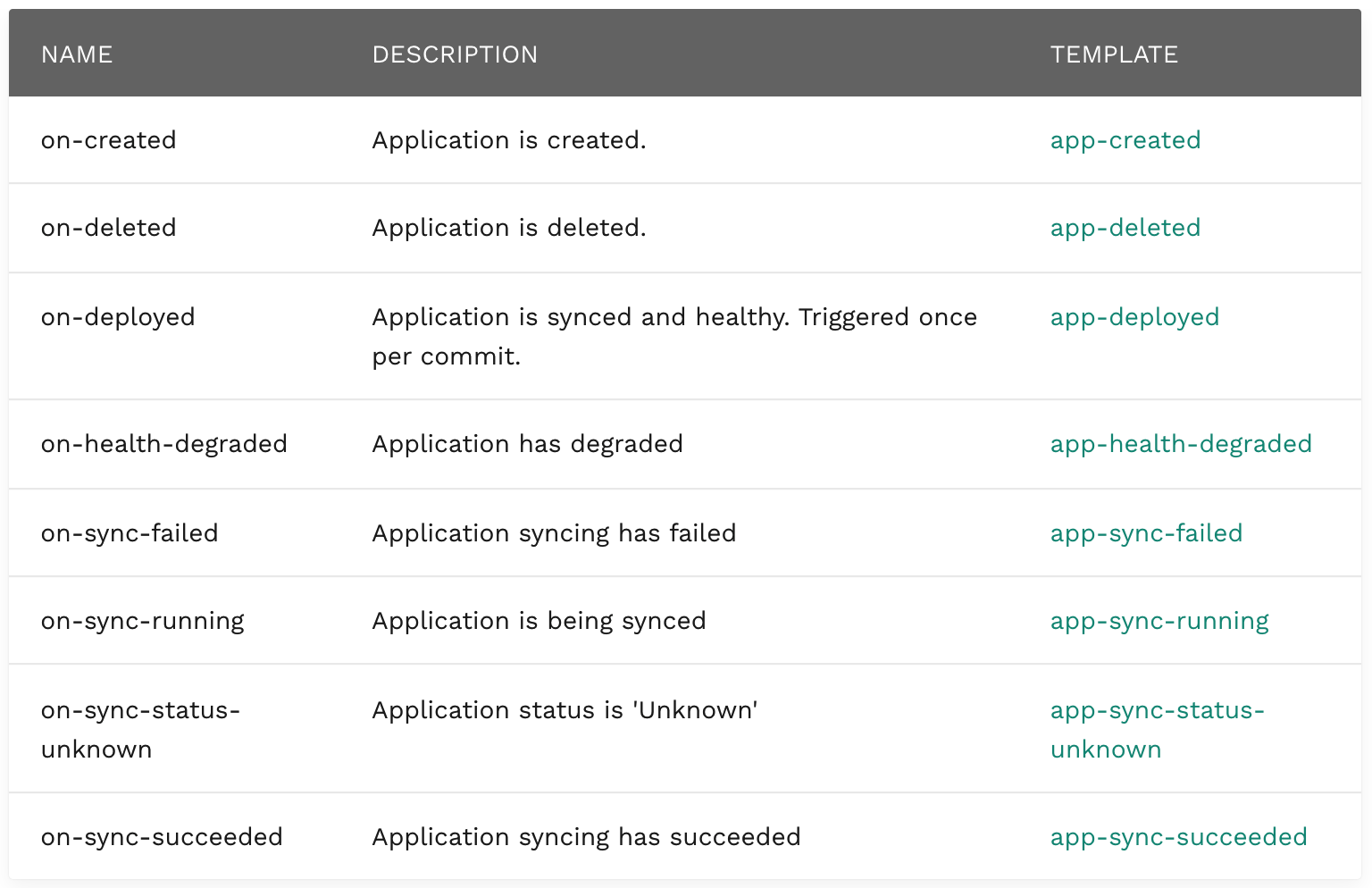
notifications.argoproj.io/subscribe.on-created.slack
notifications.argoproj.io/subscribe.on-delete.slack
notifications.argoproj.io/subscribe.on-deployed.slack
notifications.argoproj.io/subscribe.on-health-degraded.slack
notifications.argoproj.io/subscribe.on-sync-failed.slack
notifications.argoproj.io/subscribe.on-sync-running.slack
notifications.argoproj.io/subscribe.on-sync-status-unknown.slack
notifications.argoproj.io/subscribe.on-sync-succeeded.slack
2.3.1 kubectl 로 argo app에 annotation을 추가하는 방법
<app-name>, <notifications.argoproj.io/subscribe.on-sync-succeeded.slack>, <slack-channel-name> 를 각각 <> 빼고 원하는 값을 넣습니다.
kubectl patch app <app-name> -n argocd -p '{"metadata": {"annotations": {"<notifications.argoproj.io/subscribe.on-sync-succeeded.slack>":"<slack-channel-name>"}}}' --type merge
2.3.2 argocd admin 페이지에서 annotation을 추가하는 방법
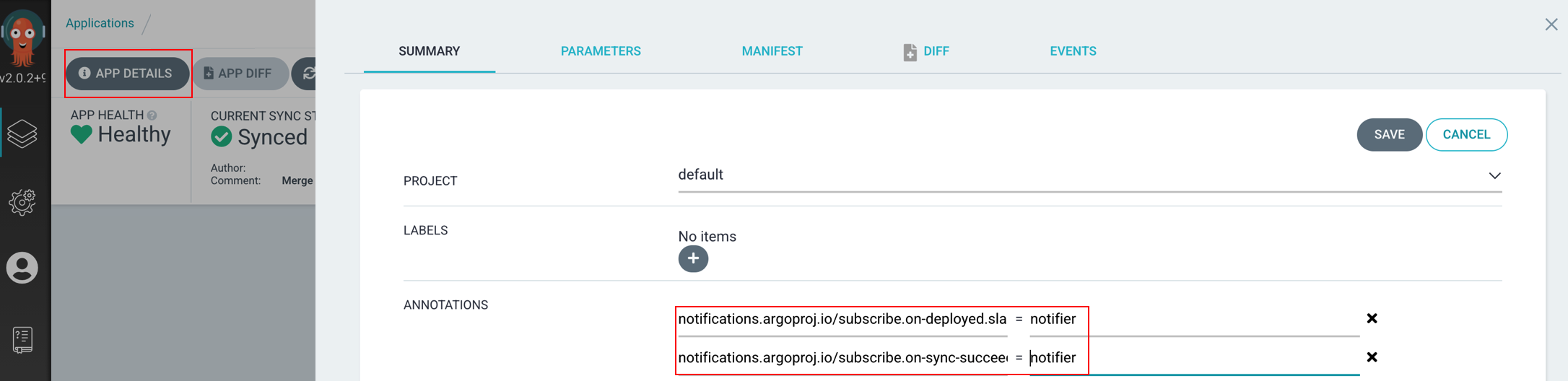
3. Trouble shooting
3.1 argocd-notifications-controller pod의 로그
time="2021-07-13T07:40:48Z" level=info msg="Start processing" app=argocd/notifier
time="2021-07-13T07:40:48Z" level=info msg="Trigger on-sync-succeeded result: [{[0].zxM90Et6k4Elb1-fHdjtDJq0xR0  [app-sync-succeeded] true}]" app=argocd/notifier
time="2021-07-13T07:40:48Z" level=info msg="Sending notification about condition 'on-sync-succeeded.[0].zxM90Et6k4Elb1-fHdjtDJq0xR0' to '{slack notifier}'" app=argocd/notifier
time="2021-07-13T07:40:48Z" level=error msg="Failed to notify recipient {slack notifier} defined in app argocd/notifier: notification service 'slack' is not supported" app=argocd/notifier
위 내용은 slack token / slack 채널에 bot 초대 / slack 채널명 상이 등과 관련 있습니다.
3.2 argocd app이 보이지 않는 경우
kubectl get app -n argocd
rancher 구성 혹은 다른 문제로 인해 위 결과가 표시되지 않을 경우, 2.3.1 트리거 방법을 사용할 수 없고
2.3.2 방법으로 트리거를 등록해야 합니다.
4. 정리
혹시 3. Trouble shooting 내용과 유사한 문제가 있거나, 의도한대로 notification 연동이 되지 않는다면 2. 처음부터 짚어보기 부분을 참고하시길 바랍니다. 가이드 문서가 여러군데로 나뉘어있고, 다른 글들에서도 조금씩 방법을 다르게 정리해 놓았는데, 위 방법으로 진행하고 나서 slack 알람이 오는 것을 확인하였습니다.
혹시나 도저히 연동이 안되어서 스트레스 받는 분이 계시다면 kubewatch로 구성하는 것이 문제없이 연동되었습니다.
5. 참고자료
https://argocd-notifications.readthedocs.io/en/stable/services/slack/
댓글남기기